Repay
In this guide, you will understand how to repay $BTC.
The process for repaying assets on any of our supported markets is similar.
1. Connect your Wallet
If you haven't borrowed any assets on Colend yet, follow this guide to borrow any of our supported assets.
2. Select the Debt to Repay
Choose the Borrowed Asset : Select the asset you want to repay and click on "Repay"
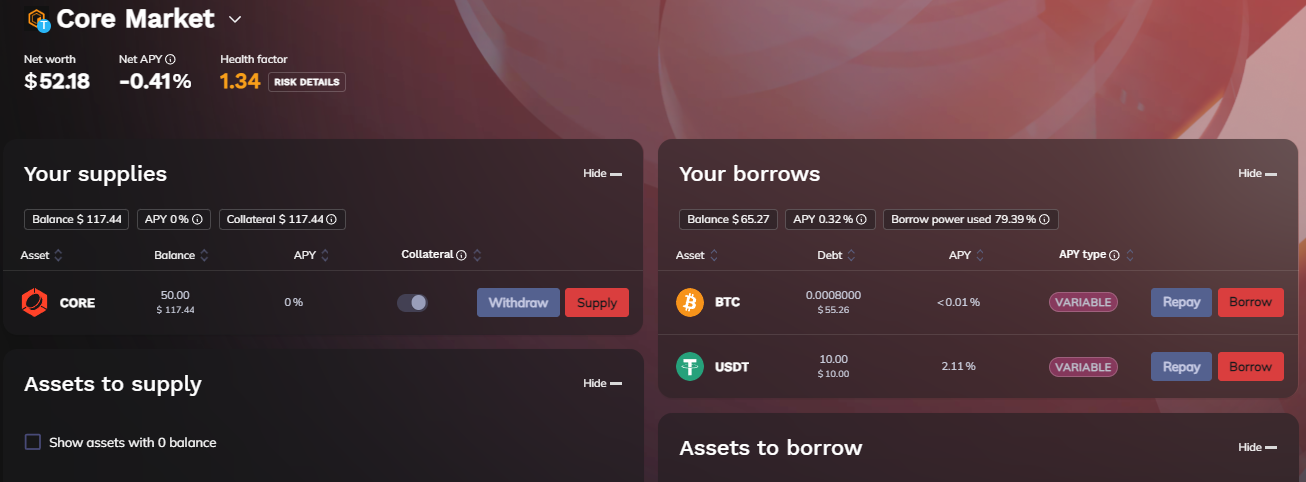
(In the “Debt” column, Check the total amount borrowed per asset. Click on “Repay” for BTC.)
3. Enter Amount
Specify the Amount to Repay : Enter the amount of $BTC you want to repay.
You can choose to repay the full amount or a part of it. Make sure the amount is available
in your wallet.
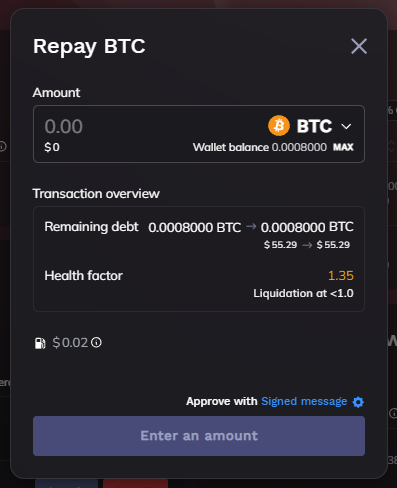
(You can choose to repay the full amount or a part of your debt.)
Consider Pending interest : When repaying your debt in full, it’s a good idea to add a small extra amount to the repayment. This margin covers any additional interest that might build up while your transaction is being processed on the blockchain.
4. Confirm and Execute the Repayment
Confirm the Transaction : Click the "Repay" button to initiate the repayment transaction.
A confirmation window will appear.
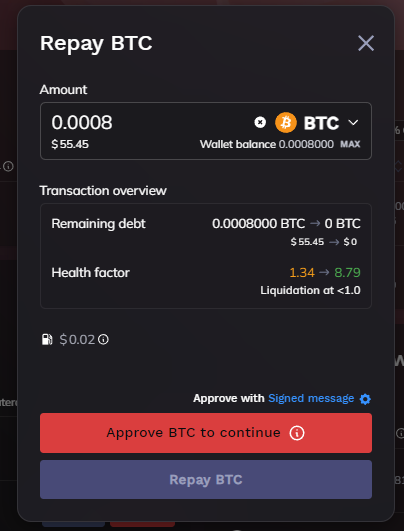
(Note that the first time you repay a crypto, an approval transaction will be necessary.)
Repaying your debt is essential to keeping your health ratio above 1, which helps you avoid liquidation. Make sure to regularly check your loans and repayments to manage your assets effectively.
Our support team is here to assist you ! Reach out to us on Telegram for more personalized support.